

A Guide to Capturing the Northern Lights with Your Cell Phone

Updated: Nov 12
Introduction:
Yes, you can photograph the northern lights with many recent Android phones and iPhones. Start with the camera's Night or Night Sight mode, support the phone on a tripod or steady surface, and keep it still until capture finishes. If the result is too dark or blurred, adjust one setting and try again.
Looking for a northern lights photograph for your wall? Browse my curated northern lights prints and digital downloads. Physical artwork and digital files are labelled separately, so you can choose your format.

1. Choose the Right Location:
- Look for a clear, dark sky away from bright lights. Planning a Saskatchewan outing? See my five northern lights viewing areas in Saskatchewan. Check current access and permitted parking before travelling.
- Research Northern Lights forecasts and choose nights with a high likelihood of auroral activity.
2. Prepare Your Gear:
- Use a cell phone with a good camera, preferably one that allows manual control of settings like ISO and exposure.
- Ensure your phone is fully charged, and bring a portable charger for extended shooting.

3. Essential Camera Settings:
- Start with the built-in Night or Night Sight mode on a supported phone. Use a tripod or stable surface, turn off the flash, and keep the phone still until capture finishes. Manual mode is an option when you want more control; it is not required to get started.
- Google Pixel: open Camera and choose Night Sight. Tap the shutter and leave the phone steady. With the phone pointed at the sky on a tripod, supported Pixels can switch to Astrophotography mode; keep it still through the countdown. See Google's Night Sight instructions.
- Samsung Galaxy: on supported models, open Camera, choose More, then Night. Take a test photo with the phone supported. The controls and available modes vary by model and software. See Samsung's Night mode guide.
- iPhone: Night mode turns on automatically in low light on supported models. Keep the phone steady and use the available Night mode exposure controls if needed. See Apple's Night mode instructions.
- Using Pro or manual mode? Check focus on a bright star and review a test photo. Adjust ISO and exposure for the brightness of the display instead of treating one low ISO range as a rule. If moving aurora loses its shape, try a shorter exposure; raise ISO if needed to keep the image bright.

4. Use a Tripod:
- A stable platform like a tripod is crucial to avoid camera shake during long exposures.
- If you don't have a tripod, improvise by placing your phone on a stable surface.

5. Reduce Camera Shake:
- Use a remote shutter release or the timer function on your phone to trigger the shot without touching it.
- After pressing the shutter, leave the phone untouched until the countdown ends. Check one photo at full size before taking more.

6. Patience is Key:
- The Northern Lights can be unpredictable. Be patient and prepared to spend hours waiting for the perfect moment.

7. Composition:
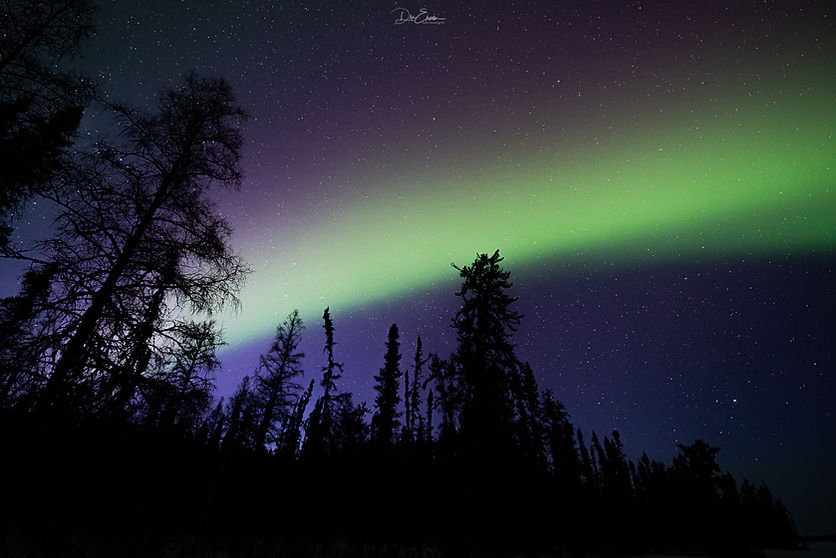
- Frame your shot with an interesting foreground, like trees, mountains, or a lake, to add depth and context.
- Experiment with different angles and compositions to find the most compelling view.

8. Post-Processing:
- Use photo editing apps to enhance your images, adjusting brightness, contrast, and color balance if needed.
- Avoid over-processing, as it can make your photos look unnatural...hint..hint...
9. Share Your Experience:
- Share your stunning Northern Lights photos with friends and on social media to inspire others.
10. Respect Nature:
- Remember to be respectful of the environment and local regulations when photographing the Northern Lights.
Conclusion:
Start with a steady phone and a test photograph, then adjust to the sky in front of you. You do not need to master every setting to enjoy being outside. For a fuller camera walkthrough, see my northern lights photography guide.

Dre Erwin


Thank you great work!